

Updated: November 2026
If you've been grinding Blood Strike for a while, you probably realized that having good mechanics isn't always enough. Sometimes, winning or losing a straight-up gunfight comes down to how well you've set up your controls and graphics. Finding the perfect balance for your sensitivity and setting up a comfortable HUD will let you move fluidly and secure those crucial headshots.
Here is the setup that is getting the best results right now for climbing the ranked ladder. It’s designed to maintain a smooth frame rate and precise controls without overcomplicating things.
Ajustes básicos de combate
To start off, we need to stop the game from making decisions for us. We want total control over our weapons.
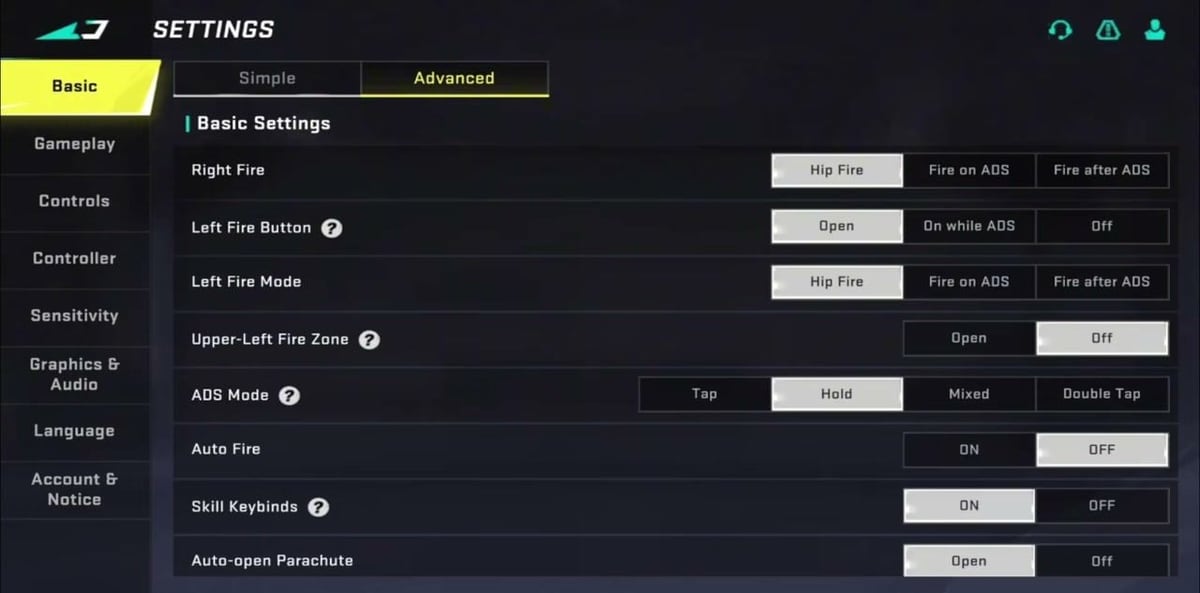
- Right and Left Fire: set them to Hip Fire. This makes close-quarters combat much faster and more responsive.
- ADS Mode: set it to Hold. It’s crucial to be able to exit aiming mode instantly just by lifting your finger.
- Auto Fire: Off. You decide when to pull the trigger, not the game.
- Aim Assist: Expert. It works much better than the beginner mode because it won't abruptly "magnetize" your crosshair when the enemy moves erratically.
- Firing Rotates Camera: Off (both left and right). This prevents you from accidentally dragging your aim when you tap the fire button.
- Auto Sprint and Jump: Off. Gives you much cleaner control over your peeks and how much noise you’re making.
Mejor configuración de gráficos y FOV
It doesn't matter how many fingers you play with if your game is stuttering. In a competitive setting, your frames per second (FPS) will always trump a pretty map.
- FPS: always set this to Extreme (or the highest option your device can handle).
- Graphics Quality: Medium or Low. Especially useful if your phone tends to heat up; it will prevent performance drops at the worst possible moments.
- FOV (Field of View): between 100 and 120. I recommend using the Associated FOV style so you don't lose peripheral vision while aiming down sights.
- Audio: lower the Music to 0% and turn Sound Effects up to 100%. Hearing footsteps clearly will save your life more times than you can count.
Sensibilidad y configuración de HUD
Copying someone else’s exact sensitivity rarely works because it depends heavily on your screen size, but here are the baseline ranges I use and recommend as a starting point:
- Camera (Mobile): keep it within the 60–80% range. If you play on a tablet, drop it to 45–65%.
- Firing Sensitivity: always about 15–25% lower than your camera sensitivity. This goes a long way in stabilizing your recoil during a spray.
- Red Dot / Iron Sights: keep this close to your base camera value.
- Long Scopes (6x–8x): lower this significantly to maintain precision for long-range shots.
Gyroscope Settings
If you want to take your recoil control to the next level, enabling the gyroscope is a game-changer. It allows you to make micro-adjustments to your aim by physically tilting your phone.
- Gyroscope: Always On or Scope Only. If you are new to this, start with Scope Only so it doesn't mess up your basic movement.
- Red Dot / 1x: 120–150%. You want this high enough to pull down recoil without breaking your wrists.
- 2x–4x Scopes: 80–110%. Lower this for mid-range tracking.
- Sniper Scopes (6x–8x): 30–50%. Keep it very low just for subtle headshot adjustments.
Advanced HUD Tweaks
Beyond just the fire buttons, your HUD needs to feed you information without blocking your view.
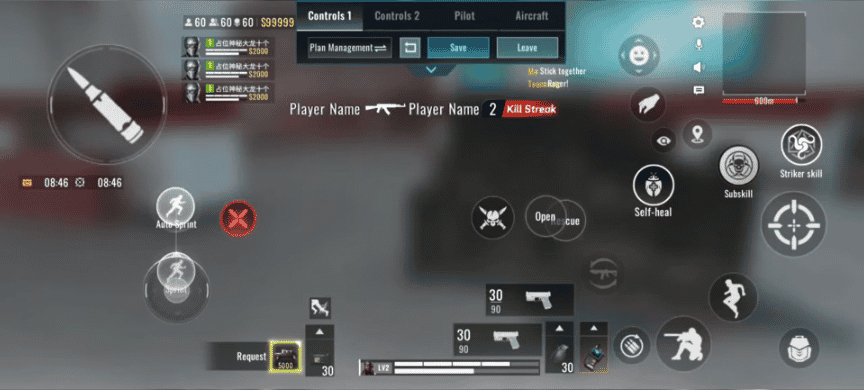
- Mini-map: Move it closer to the center-top or center-left of your screen. You want to be able to glance at enemy pings without looking away from your crosshair.
- Button Opacity: Lower the transparency of all your buttons to around 30-40%. Once your muscle memory kicks in, you don't need to see the buttons, but you do need to see the enemy hiding behind them.
- Grenade/Utility: Keep these accessible to your index fingers (if playing claw) so you can throw flashbangs while still strafing.
Take a few minutes in the training range to test all these tweaks. Shoot some bursts at medium range, adjust the sensitivity up or down a couple of points if you feel your crosshair drifting, and stick to whatever feels the most natural.
Now that your settings are fully optimized, it's time to hit the ranked queue. Want to earn rewards while you play? Create an account on olagg.io to discover the latest events, get rewards, and stay updated on all things Blood Strike.
0
0
Create your account and play OLA TCG Battle
You get 34 free credits — enough for 6 packs or 34 battles. No deposit.
Sign up and playEtiquetas


