

Updated: November 2026
If you're playing Brawl Stars in 2026 and looking for that competitive edge in Ranked, you've probably wondered how to tweak your sensitivity. Here's the truth: the game doesn't actually have a traditional sensitivity slider. What truly dictates how fast you react is your control layout, where you place your buttons, and how your movement joystick behaves.
A bad layout means your thumb has to travel further than necessary, costing you duels you should be winning. In this guide, I'll walk you through the absolute best settings so your fingers can fly across the screen without blocking your view.
The Truth About Sensitivity and Joystick Settings
In Brawl Stars, "sensitivity" is just a mix of your button placement and joystick behavior. The very first step to fixing your inconsistency is to lock your movement joystick.
An unlocked joystick might feel chill for casual play, but when things get tense, the anchor point shifts around the screen. This totally wrecks your muscle memory and makes you whiff those quick dodges. A locked joystick set to a medium-large size guarantees your thumb always returns to the exact same spot, giving you reliable and predictable movement.
Best Controls and Button Placement
Don't just copy your favorite content creator's layout blindly; you need to adjust these settings to fit your phone size and your hands:
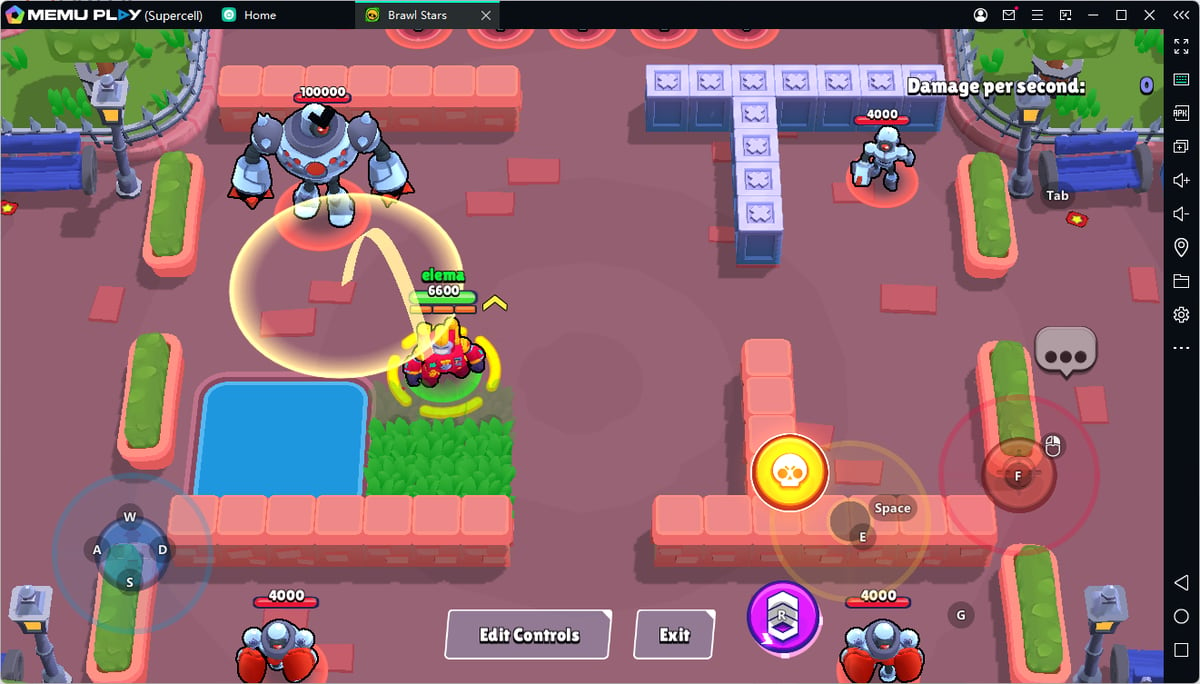
- Attack Button: Keep this medium-sized. It should sit exactly where your right thumb naturally rests on the screen. If you make it too huge, dragging your finger for max-range shots will feel extremely clunky.
- Super Button: Make this big and tuck it as close to your attack button as possible. The key to playing brawlers like Mortis or Fang is chaining your basic attack into your Super without hesitation.
- Gadgets and Hypercharge: Shift these buttons upward. If you stack them right next to your attacks, you're going to accidentally pop a gadget at the worst time. A lot of competitive players use a claw grip, dedicating their right index finger to quickly tapping the Gadget and Hypercharge without ever taking their thumb off the attack button.
Auto-Aim vs Manual Aim: Which is Better?
Knowing when to aim manually and when to let the game take the wheel is what separates low ranks from Masters.
- Auto-Aim: Use this in point-blank fights. If the enemy is literally on top of you, or if you're running tanks and assassins like Bull, El Primo, Edgar, or the recent Kenji, just spam that button.
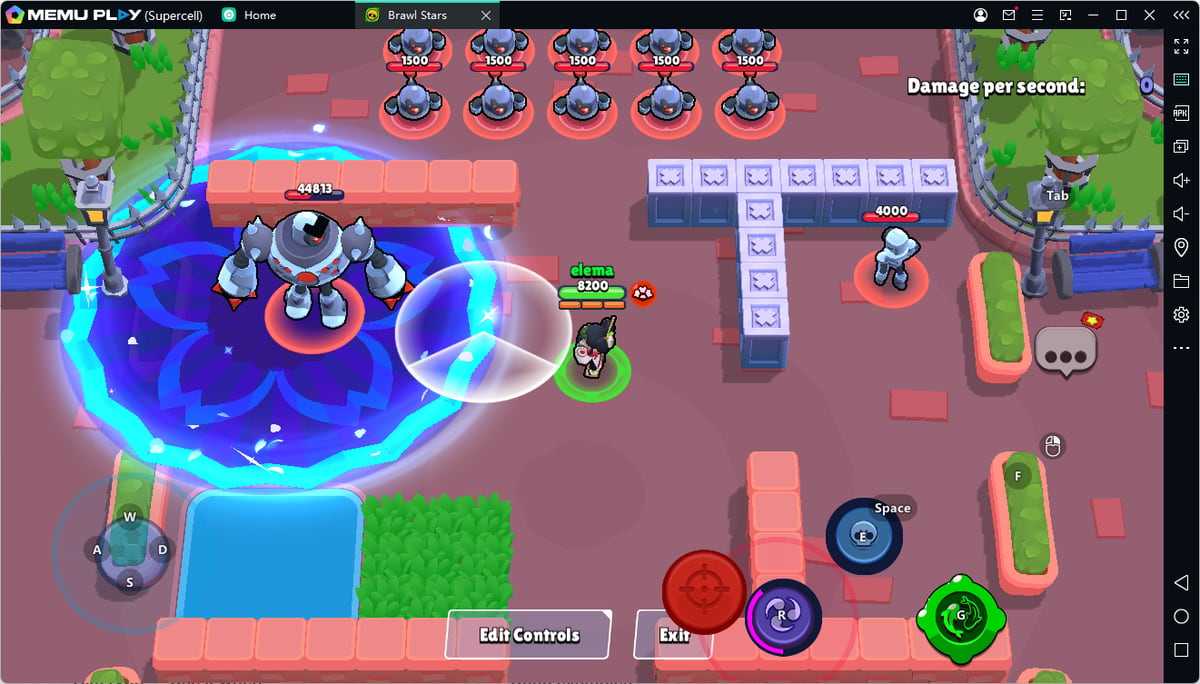
- Manual Aim: Absolutely mandatory for long distances, predictive shots, throwers, and precision Supers. Snipers like Piper, Belle, Brock, and Mandy rely 100% on predicting enemy movement through manual aiming.
Settings Based on Your Brawler Role
You don't need to rebuild your UI every single match, but having a general setup that caters to your main class is a game-changer:
- Snipers and Throwers (Piper, Dynamike, Tick): Your priority is aiming down long lanes. Keep your attack button moderate in size and clear out the top-right side of your screen. You need full visibility to calculate your drag shots without your own hand blocking the view.
- Assassins and Tanks (Buzz, Edgar, Mortis): Combo speed is everything here. Scale up your Super button and put your Gadget within immediate reach so you can dive in without delay. This is where the three-finger claw grip really shines.
- Support and Control (Gene, Lou, Max): Spacing and vision are your best friends. You need to see enemy lanes, bushes, and chokepoints. Push those extra buttons away from the center of the action so you have an unobstructed view of the map.
Why You Should Ditch the Default Layout
The stock two-thumb layout Brawl Stars starts you with is fine for learning the ropes, but it forces your right thumb to juggle attacking, throwing Supers, popping Gadgets, and activating Hypercharges. As you climb the ranks, losing a split second trying to reach your Gadget will get you eliminated.
According to player consensus on the r/BrawlStars community and pro layouts seen in the Brawl Stars Championship, transitioning to a three-finger grip (where your right index handles the top zone for Gadgets) is an excellent middle ground. It might take a couple of days of normal matches to get used to, but your reaction times will improve massively.
Final Checklist Before Queuing Ranked
Before you jump into a match and start dropping trophies, load up the Training Cave and run through these steps:
- Confirm Joystick Lock: Strafe side to side quickly. Does your thumb slip off center? Adjust the size until it feels solid.
- Natural Thumb Rest: Close your eyes, put your thumb on the screen, and press attack. If the button isn't right under your thumb, move it.
- Attack-Super Combos: Try firing and instantly popping your Super. If you have to look down at your fingers, move the buttons closer together.
- Top Buttons: Tap your Gadget quickly without your hand covering the bots on screen.
- Haptic Feedback: Turn this on if it helps you feel confirmed long-range hits with brawlers like Belle or Piper. If it distracts you, kill it.
- Hardware Performance: If you're pushing 90Hz or 120Hz, play a few test games. If your phone gets hot and your aim starts skipping, throttle it back to a stable 60 FPS.
A smooth game beats a flashy setting that causes input lag. See you in the arena!
Ready to dominate Ranked? Register on olagg.io today to get the latest Brawl Stars meta updates, tier lists, and exclusive competitive guides delivered straight to your dashboard.
0
0
Create your account and play OLA TCG Battle
You get 34 free credits — enough for 6 packs or 34 battles. No deposit.
Sign up and playEtiquetas


