

Updated: 2026
Hey everyone! We all know Clash Royale is an absolute giant when it comes to mobile competitive gaming. But what if you're out of battery, sitting at your PC, or using a school/work laptop and just want a quick match without downloading heavy emulators like BlueStacks? The good news is that you have excellent options to play directly in your browser. Whether you want to try free HTML5 mini-games that capture the same arena magic or use cloud gaming to play the official app, you're covered. Let's dive into how to access these titles and some tips to dominate the matches.
Method 1: Play Free Clash Royale Online Alternatives (HTML5)
When you're looking to play Clash Royale online without any account logins, you'll mostly find awesome clones hosted on free gaming platforms like JogosFas or Titotu. The best part is that these HTML5 games offer high-quality graphics and run completely lag-free, even if you have a spotty internet connection.
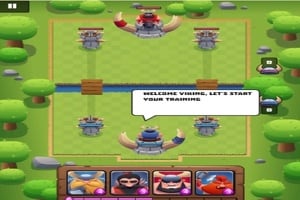
One of the standout titles right now is Clash of Vikings. If you're tired of using the same old Supercell cards and want to try something new, this game puts a Nordic twist on the classic formula. The mechanics are exactly what you're used to:
- Collect Cards: Build the ultimate deck with warriors, archers, and spells.
- Elixir Management: Units cost elixir, which regenerates over time.
- Tower Defense: Destroy the enemy's two side towers and the main king tower to win.
Method 2: Cloud Gaming (Play the Official Game)
If you don't want a clone and absolutely need to push your actual Supercell trophies, cloud gaming is your best bet for 2026. Platforms allow you to stream the mobile game directly to your browser. You just visit the site, search for Clash Royale, log in with your Supercell ID, and play. The catch? You need a very stable internet connection, as input lag can make you miss that crucial Zap placement.
Step-by-step: How to play Clash Royale mini-games on PC
You don't need to jump through any hoops, configure accounts, or install complex software to play the HTML5 clones. Getting into a match is incredibly easy:
- Visit a gaming portal: Head over to websites like JogosFas or Titotu.io.
- Search for the game: Look up titles like Clash of Vikings or browse the tower defense/IO categories.
- Optimize your browser: For the smoothest frame rate, ensure "Hardware Acceleration" is turned on in your Chrome or Edge settings.
- Grab your mouse: The controls are straightforward. Use your Mouse to select your cards at the bottom of the screen and click on the arena to deploy your troops.
- Upgrade your deck: Win battles to open chests, collect gold, and upgrade your units for harder levels.
Understanding Clash of Vikings Units
To build an unbeatable deck in these browser clones, you need to understand unit synergy:
- Tanks: Heavy, slow-moving units that absorb damage. Place them at the back of your arena to build up elixir before they cross the bridge.
- Swarm Units: Cheap, multiple units great for surrounding and destroying single-target enemies.
- Spells: Use arrows or fireballs to clear out weak swarm units instantly. Don't waste them on the main tower alone!
Troubleshooting Browser Lag
If your game feels choppy:
- Clear your browser cache.
- Close extra tabs eating up your RAM.
- Make sure you aren't downloading heavy files in the background, as both cloud gaming and HTML5 IO games rely heavily on real-time data packets.
Advanced Tips and Tricks to Win
Even though you're playing a browser mini-game, you can't just throw all your troops onto the field and hope for the best. Strategy is everything!
- Master Resource Management: The most important rule in Clash of Vikings is managing your Elixir. It's tempting to spend it all on a massive attack right at the start, but if you do, you'll have nothing left to defend.
- Counter-Pushing: Patience pays off. Learn when to hold back and defend against your opponent's push. Once they are out of elixir, drop your tank and counter-attack effectively.
- Mouse Precision: Since you aren't using a touchscreen, practice dragging and dropping cards quickly with your mouse. Misplacing a spell by a few pixels can cost you the tower.
Whether you're playing a quick clone solo or challenging online opponents, these free browser games are a fantastic way to test your tactical skills. Ready to discover more browser-based gems and web3 competitive games? Bookmark the Olagg.io guides section and join our community to stay ahead of the meta!
0
0
Create your account and play OLA TCG Battle
You get 34 free credits — enough for 6 packs or 34 battles. No deposit.
Sign up and playEtiquetas


