
'/%3e%3cpath%20d='M4.94162%205.99547L4.02701%205.08086L3.63428%205.47359L4.94162%206.78093L7.63768%204.08487L7.24495%203.69214L4.94162%205.99547Z'%20fill='white'/%3e%3cdefs%3e%3clinearGradient%20id='paint0_linear_2302_10195'%20x1='0.5'%20y1='10'%20x2='10.4939'%20y2='10'%20gradientUnits='userSpaceOnUse'%3e%3cstop%20stop-color='%234E10FF'/%3e%3cstop%20offset='1'%20stop-color='%23AB17DF'/%3e%3c/linearGradient%3e%3c/defs%3e%3c/svg%3e)
Updated: 2026
If you lost access to your Free Fire account due to theft, an unfair ban, or simply forgetting the password to your linked Facebook or Google profile, the panic is real. However, using your Player ID (UID) is the definitive official recovery method. This guide details exactly what you need to do based on Garena's 2026 support protocols to restore your progress, skins, and diamonds safely, without falling for scams.
Steps to recover Free Fire account by ID (with recovery email)
If you were cautious and bound a recovery email to your account directly in the game, your life is much easier. According to official Garena support in 2026, the process takes a few minutes and allows you to bind your profile to a new social network.
- Create or have ready a new platform account (Facebook, Google, VK) that is not yet linked to Free Fire.
- Open the game and go to the login screen. If you are logged in with another account, log out from the settings.
- Tap the "Account Recovery" button.
- Read the instructions and press "Go to".
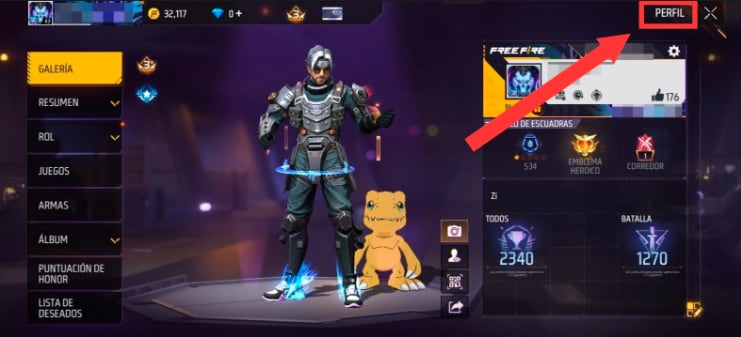
- Enter your recovery email and tap "Send" to receive a verification code.
- Check your email inbox, copy the code sent by Garena, and paste it into the game. Tap "Verify".
- Double-check that the player name and UID match your lost account, and select the new platform you want to bind it to.
- Log in with the new platform and you are good to go.
Your OLA account is worth prizes
Play the Claw, hunt the treasure and redeem in the Store. Creating an account is free.
Create my accountWhat to do if you lost access to Facebook or Google
Most of us link our accounts to Facebook, Google, Twitter/X, or Apple ID. If what you lost was access to that specific social network, Garena cannot do much for you directly, since they do not handle other companies' passwords.
In this case, your first step is to use the official Facebook Help Center or Google Account Recovery portals to verify your identity and regain access to the social profile itself. Garena cannot bypass another company's security. Once you regain control of that email or profile, your Free Fire account will automatically load again when you log into the game.
How to recover a stolen or hacked Free Fire account
This is different from losing an email password. If you notice that someone changed your nickname, region, or suddenly you can't log in with your usual social network, your account was most likely stolen.
If you still have access to the linked social network, change the password immediately from that platform (not from the game), because whoever stole it might still have an active session. If you have lost total access, you need to open a direct ticket on the Garena support website.
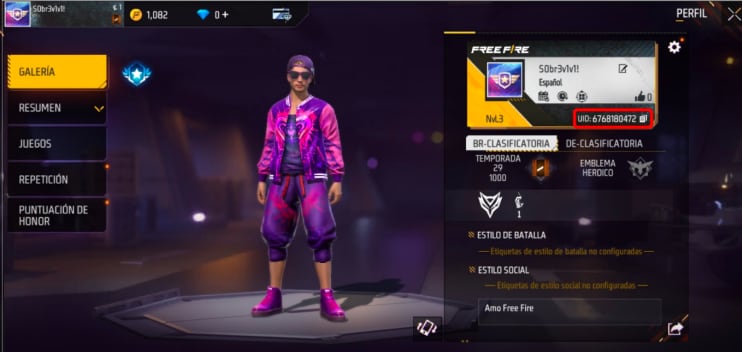
For this to work, Garena will ask for:
- Your exact UID (the 5 to 15 digit number).
- Your current nickname (respecting capital letters and symbols).
- Your server region (like NA, SAC, or IND).
- Diamond purchase receipts from Google Play or the App Store (this is the strongest proof of ownership in 2026).
Open the ticket and be patient, as it might take them a few days to reply.
Suspended account or ban in Free Fire: can it be fixed?
Not every login alert means the end of your account. If the game shows an "Under investigation" message, it means Garena detected something unusual (like a RAM optimizer or an active VPN). Generally, this is temporary and resolves itself if you uninstall the app causing the conflict.
On the other hand, if you have a suspension due to a chargeback (when the bank reverses a diamond top-up), you can appeal by paying the difference via support. But if the ban message mentions confirmed hacks or unauthorized modifications, say goodbye: it is permanent and there is no appeal, no matter your account level.
Also, if you played on a guest account and lost the device data, I'm sorry to say it's almost impossible to recover, as the UID alone is not enough to prove you own it.
Watch out for scams when searching for your ID
Out there, there are many sites and supposed checkers, like Verify ID FF Beta, Zoritruco, or Olocomplo, that promise to return your account or give you diamonds just by entering your ID. They are all scams designed to steal your data.
Legitimate third-party tools only show public data: your level, match stats, likes, and creation date. They will never ask for passwords or emails. Remember: the only official place to solve login issues is the Garena support page. Keep your data safe and don't share it on sketchy forms.
Never miss a code or guide
Keep your account secure and stay ahead of the meta. Register on olagg.io to get the latest Free Fire news, official reward codes, and exclusive guides delivered straight to your profile.
0
0
Etiquetas


