
'/%3e%3cpath%20d='M4.94162%205.99547L4.02701%205.08086L3.63428%205.47359L4.94162%206.78093L7.63768%204.08487L7.24495%203.69214L4.94162%205.99547Z'%20fill='white'/%3e%3cdefs%3e%3clinearGradient%20id='paint0_linear_2302_10195'%20x1='0.5'%20y1='10'%20x2='10.4939'%20y2='10'%20gradientUnits='userSpaceOnUse'%3e%3cstop%20stop-color='%234E10FF'/%3e%3cstop%20offset='1'%20stop-color='%23AB17DF'/%3e%3c/linearGradient%3e%3c/defs%3e%3c/svg%3e)
Updated: June 2026
In CS2, precision is absolutely everything. Having great aim helps a ton, but using the right crosshair can be the difference between hitting that crucial headshot or losing the round entirely. Nowadays, professional players rarely use dynamic crosshairs; the trend is heavily skewed towards small, static, and ultra-clean crosshairs that don't distract you from your target.
If you want to test out the exact configurations used by the best in the world, you're in the right place. In this guide, we go over the updated crosshairs of donk and s1mple, two absolute beasts in the pro circuit, featuring the exact codes they've been using in their most recent matches this year.
CS2 Pro Crosshair Codes in 2026
Below is the complete list of crosshair codes. Keep in mind that every player usually has a few variants depending on the map or how they are feeling that day, but these are their main ones.
donk crosshair codes
Team Spirit's young prodigy has been rotating between a few setups, all focused on extreme spray control and visibility.
- CSGO-ZRvam-DXhLD-XN2xf-pA5Dm-df5BO: His most recent main crosshair, used in tournaments during June 2026 on maps like Nuke and Dust II.
- CSGO-TaM3Q-GFU5p-J4Mtu-bSqZw-vyJzN: Variant used on Mirage in his recent matches against 9z.
- CSGO-UseJt-3oTvn-47wPX-hEyER-WZfiK: A very popular green crosshair that donk used earlier in June against BetBoom.
- CSGO-O36iX-6VGeQ-pnJLm-UWkab-osuWK: Code used in May 2026 during his matchups against Falcons and G2.
- CSGO-FtVed-Mf7pp-Zi6MU-JczeM-GjYbD: An alternative he brought out in April against Team Vitality.
s1mple crosshair codes
The legendary s1mple continues to give masterclasses in precision. Funnily enough, some of his crosshairs overlap with other pros, proving that certain setups are just flat-out superior.
- CSGO-UseJt-3oTvn-47wPX-hEyER-WZfiK: His current crosshair with BC.Game in May 2026. Yep, it's the exact same configuration that donk has also been using.
- CSGO-ofZGe-jF5oG-AruLr-ymSJJ-VvUrC: Variant used on Dust II against Vitality in May 2026.
- CSGO-E8xcE-27Lmw-2ipNt-3HZvp-pevvE: Code used earlier in 2026 against GamerLegion.
- CSGO-m58cB-AyBDC-AV6tp-Gwq2K-QGKeB: A classic crosshair from his time competing with FaZe in 2025.
- CSGO-QY6Hw-SkQGh-8Fvak-eUaLc-iL5mA: Setup used in late 2024 tournaments.

How to import crosshair codes step by step
Copying a pro's crosshair is super simple. You don't need to type long commands into the console, just follow these steps inside CS2:
- Open CS2 and click on the gear icon on the main screen to open the settings menu.
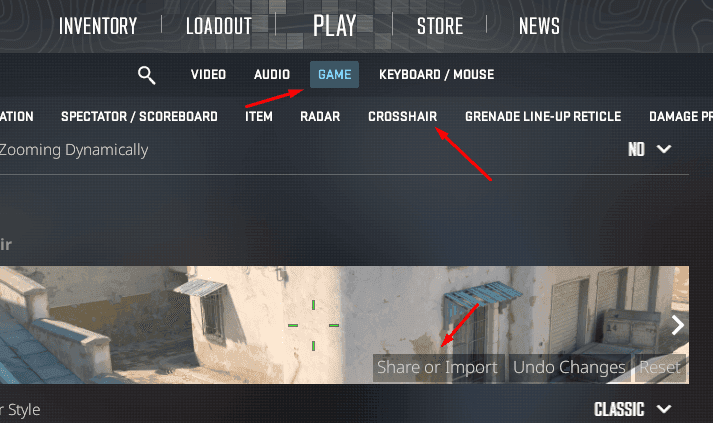
- Navigate to the Game tab and then select the Crosshair section.
- Look for the button that says Share or Import.
- Paste the crosshair code you chose from the list above directly into the text box.
- Click the IMPORT button and you're good to go, your new crosshair will be applied instantly.

Why you should try these configurations
If we analyze the commands behind these crosshairs (like cl_crosshairsize 1 or cl_crosshairgap -4.5), we'll notice they are designed to stay out of the way. By using vibrant colors like green (cl_crosshaircolor_g 255) and disabling dynamics (cl_crosshairstyle 4), you ensure the crosshair is a fixed and reliable reference point in any lighting situation.
Testing the setups of donk and s1mple won't magically turn you into a Major winner, but it's an excellent starting point. If you feel the crosshair is too small, you can always go into the settings and adjust the size or thickness until it feels perfect for your playstyle.


0
0
NEWSLETTER
Subscribe!
And find out the latest news
Etiquetas


