

Nintendo has just introduced one of its players' most requested features: the ability to purchase digital video games and send them directly as gifts through the Nintendo eShop. The feature arrived on November 17, 2026, for Nintendo Switch and Nintendo Switch 2, allowing users to gift games, downloadable content, and upgrade packs. However, there's an important condition: you can only send gifts to people who belong to the same family group as your Nintendo Account. There are also regional restrictions, purchase limits, and products that aren't eligible. Here's how it works, what you need to use it, and its main limitations.
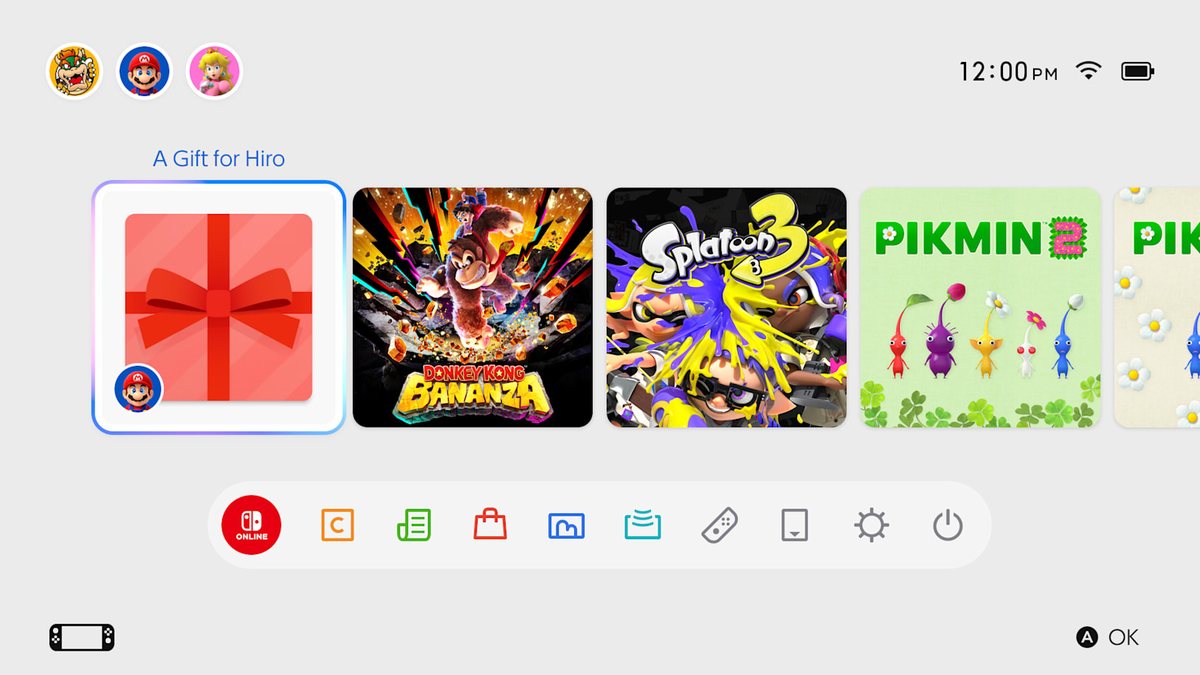
Nintendo has decided to make something many players have wanted for years much easier: gifting digital video games directly through its console storefront.
Until now, people who wanted to give someone a Nintendo Switch game usually had to buy a physical copy, a Nintendo eShop gift card, or a download code.
With the new feature, you can select a digital game, purchase it as a gift, and send it directly to another console.
The feature is available for Nintendo Switch and Nintendo Switch 2 through a digital storefront update.
It also arrives at an especially convenient time, as many players begin searching for gifts for the holiday season.
However, it's not all good news.
Unlike some other platforms, Nintendo doesn't allow you to freely gift games to anyone on your friends list.
The system has specific requirements you should understand before attempting to make a purchase.

When Did Digital Game Gifting Become Available on Nintendo Switch?
Nintendo announced the new feature on November 9, 2026, alongside a system update designed to prepare consoles for its introduction.
System version 23.5.0 added the necessary compatibility for digital gifting.
Nintendo subsequently scheduled a Nintendo eShop update for November 17, 2026, the date listed on its Latin American support pages.
The feature allows users to purchase eligible digital products and send them as gifts without buying a separate download code.
Does It Work on Nintendo Switch and Nintendo Switch 2?
Yes. Nintendo confirmed compatibility with both console generations.
Supported models include:
- Nintendo Switch.
- Nintendo Switch Lite.
- Nintendo Switch OLED.
- Nintendo Switch 2.
The main requirement is to have a compatible system version and access the Nintendo eShop using a Nintendo Account.
You don't need to purchase a Nintendo Switch 2 to use this feature.
You can also use it on a previous-generation console, provided it meets the relevant requirements.
You can review the update details on Nintendo's official Switch support page.
How to Gift a Digital Game on Nintendo Switch
Nintendo published an official guide explaining how to purchase and send a video game as a gift.
The process takes place in the Nintendo eShop and allows you to choose the recipient before completing your purchase.
Step 1. Open the Nintendo eShop
From the HOME Menu on your Nintendo Switch or Nintendo Switch 2, open the Nintendo eShop.
Search for the video game you want to gift and visit its product page.
If the product supports digital gifting, an option labeled Give as a Gift will appear.
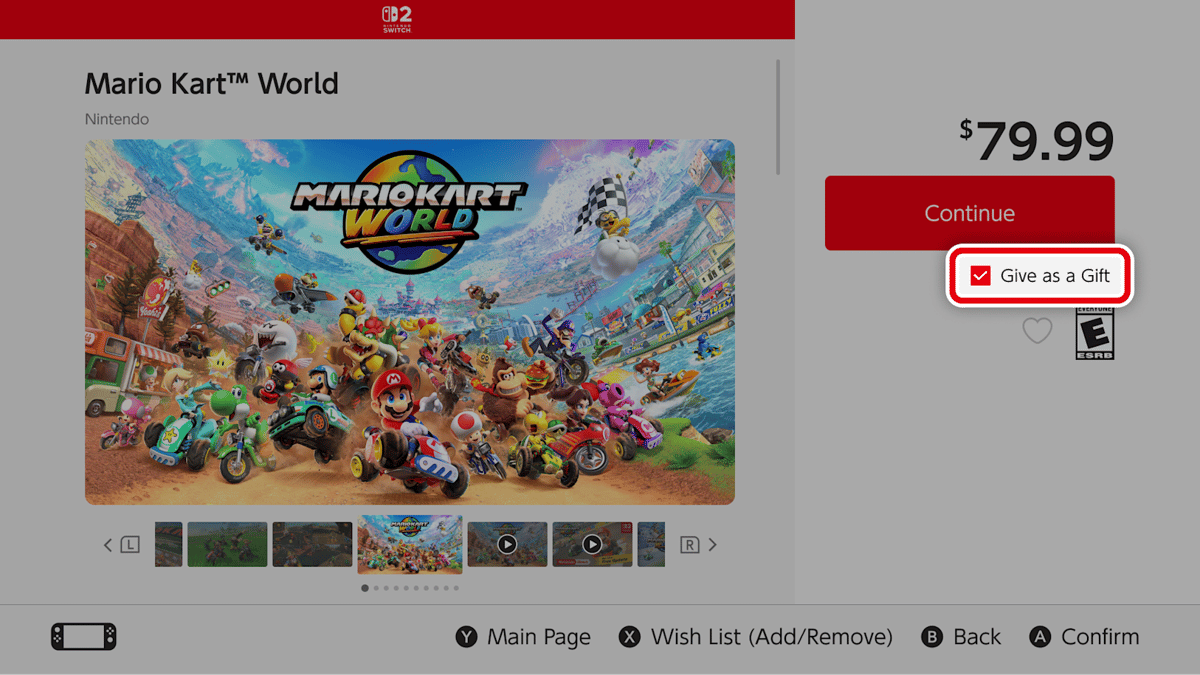
Official Nintendo screenshot showing the option to send a game as a gift.
Step 2. Choose Who Will Receive the Game
After selecting the gifting option, Nintendo will display eligible users who belong to your family group.
You can then select the recipient.
If that person has multiple linked consoles, you'll also be able to choose which console should receive the game.
Important: You won't be able to freely select anyone from your friends list.
The recipient must belong to the same Nintendo Account family group.
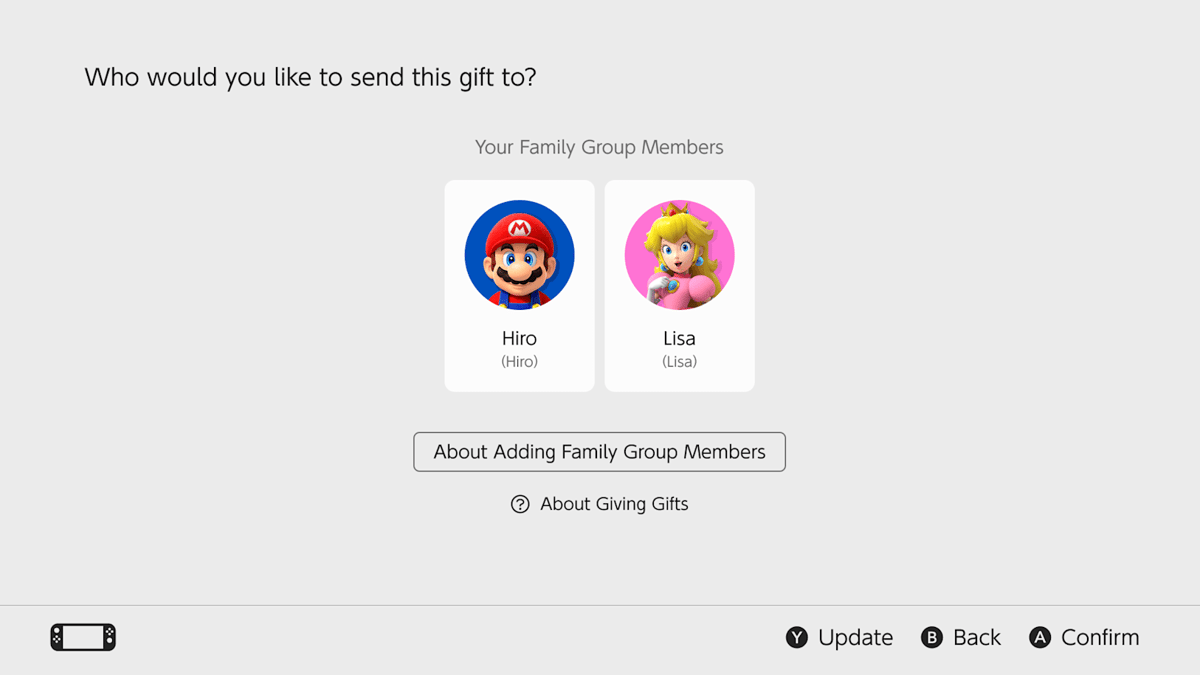
Nintendo lets you choose a recipient from your family group.
Step 3. Customize the Gift Wrapping
Nintendo has also introduced a small customization feature for gifts.
Before completing the purchase, you'll be able to select the color of the virtual wrapping and other available options.
This allows the recipient to receive the game as a surprise on their console.
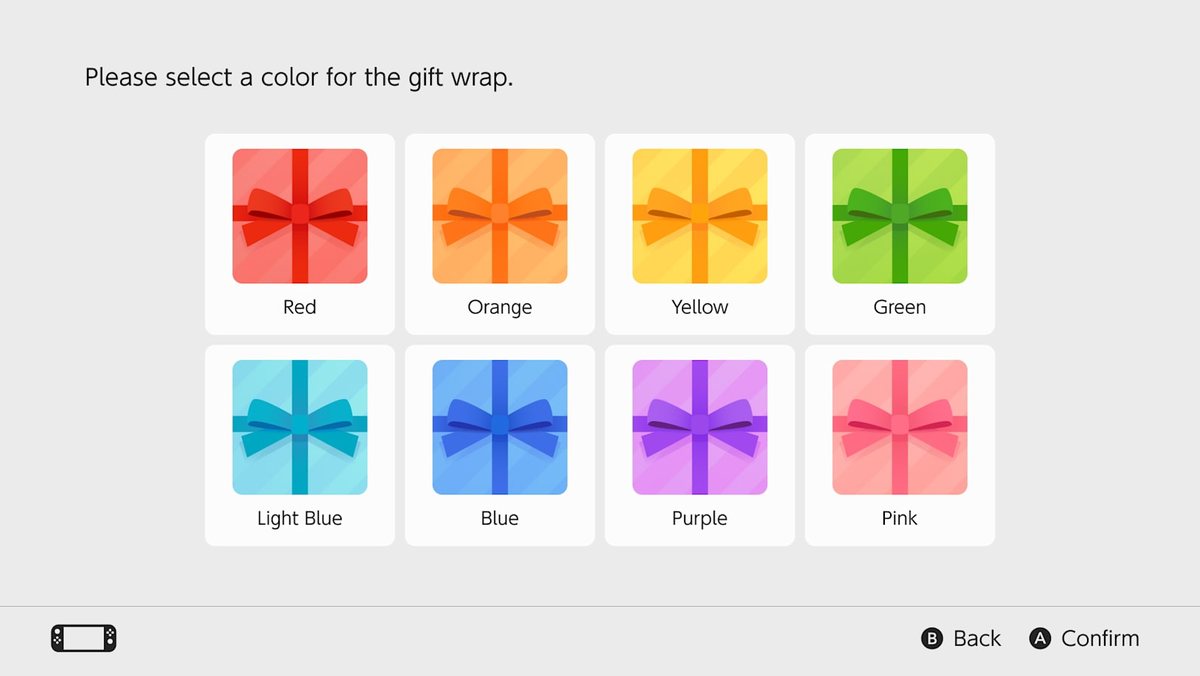
Players can choose digital gift wrapping before sending their gift.
Step 4. Complete Your Purchase
After selecting the recipient and customizing the gift, simply complete your payment using the methods available in the Nintendo eShop.
Nintendo confirmed that gifts are sent immediately after the purchase is completed.
For this reason, if you want to surprise someone on a special date, it's best to make the purchase when you want them to receive the gift.
For now, the company hasn't introduced a general option for scheduling delivery on a later date.
Step 5. The Recipient Receives the Game
Once the process is complete, the gift will appear directly on the selected console's HOME Menu.
The recipient can open it, accept it, and download the content to start playing.
Nintendo also states that recipients must have previously accessed the Nintendo eShop from one of their consoles to receive gifts.
They won't need to manually enter a download code, as they would with traditional gift cards.
You can review the entire process in Nintendo's official digital gifting announcement.
The Biggest Restriction: You Can Only Gift Games to Your Family Group
Although the new feature represents an important improvement, Nintendo has established a restriction that has drawn criticism from some players.
Digital gifts can only be sent to people who belong to the same Nintendo Account family group.
This means you won't be able to directly purchase a game for just any friend, even if they're already on your console's friends list.
To use the system, you'll first need to add that person to your family group.
How Many People Can Join a Nintendo Family Group?
Family groups can include up to eight Nintendo Accounts, including the administrator's account.
The system can be used to manage different users and certain features within Nintendo's ecosystem.
Not all members need to use the same console.
Each person can have their own Nintendo Account and compatible device.
Additionally, creating a family group doesn't necessarily mean purchasing a Nintendo Switch Online Family Membership.
To use digital gifting, the announced requirement is to belong to the same Nintendo Account family group, not to purchase a Nintendo Switch Online Family Membership.
How Do You Add Someone to Your Family Group?
If you don't have a family group yet, you can set one up through your Nintendo Account settings.
- Visit the Nintendo Account website.
- Sign in with the account that will manage the group.
- Find the Family Group section.
- Select the option to add a new member.
- Follow the instructions to invite another Nintendo Account.
- Wait for the person to accept the invitation.
The procedure may vary for child or supervised accounts.
Nintendo provides additional instructions in its official guide to adding family group members.
Can You Gift Games to Friends in Other Countries?
This is another important restriction.
Nintendo requires digital gift recipients to belong to the same family group and have the same country configured on their Nintendo Accounts.
For example, if you use an account registered in Mexico, you should make sure the recipient's account is also configured for Mexico.
Being in the same family group doesn't automatically remove regional restrictions.
This condition is particularly relevant for players who have friends or relatives in different Latin American countries.
Before paying, make sure the recipient appears among the eligible accounts and that the product can be sent as a gift.
The ability to share a Nintendo Switch Online Family Membership shouldn't be confused with the requirements for gifting video games.
What Games and Content Can You Gift Through the Nintendo eShop?
Nintendo confirmed that the feature isn't limited to full video games.
It also allows users to send certain types of additional content, provided they're marked as eligible for gifting.
The list includes:
- Digital games: Full titles available through the Nintendo eShop.
- Downloadable content (DLC): Expansions and additional content for selected games.
- Upgrade packs: Products that upgrade certain Nintendo Switch games to their Nintendo Switch 2 editions.
This means you could, for example, gift a compatible expansion or upgrade pack without necessarily purchasing the entire game.
However, there are several exceptions.
Products You Can't Gift
Nintendo warns that not every product available on the Nintendo eShop can be purchased as a gift.
The announced restrictions include products the recipient already owns, certain preorders, and games whose age ratings are incompatible with the recipient's account.
There are also specific restrictions depending on the region.
For this reason, you shouldn't assume that every game, DLC, or upgrade pack will have the gifting option enabled.
The easiest way to check is to visit the product page and see whether the Nintendo eShop allows you to send it as a gift.
All Nintendo Digital Gifting Restrictions
To avoid confusion, these are the main conditions you should understand before purchasing a gift.
| Condition | How It Works |
|---|---|
| Compatible consoles | Nintendo Switch and Nintendo Switch 2, including compatible Switch models. |
| Required update | System version 23.5.0 or later. |
| Recipients | Eligible members of the same family group only. |
| Maximum group size | Eight Nintendo Accounts per family group. |
| Region | Both accounts must have the same country configured. |
| Supervised accounts | Cannot send digital gifts. |
| Games already owned by the recipient | Cannot be sent again as gifts. |
| Preorders | Not eligible for gifting under the published conditions. |
| Purchase limit | A limit applies to gifts within a given period, but Nintendo has not publicly specified a general quantity. |
| Delivery | Immediate after completing the purchase. |
Eligibility conditions and age-rating restrictions may vary depending on the country and product. Nintendo recommends checking these details before purchasing.
Is Gifting a Game the Same as Lending a Virtual Game Card?
No. Although both features involve digital games, they work differently.
Nintendo previously introduced Virtual Game Cards, a system that allows players to manage digital titles in a way similar to physical cartridges.
One of its features allows users to temporarily lend games to other members of a family group.
However, lending a video game isn't the same as gifting it.
When you lend a Virtual Game Card, the original purchaser remains the owner of the title.
The loan is temporary and subject to Nintendo's usage conditions.
By contrast, the new gifting feature allows you to purchase a new digital copy for another person, who receives the product on their account.
Differences Between Gifting, Lending, and Buying a Nintendo eShop Gift Card
| Method | What the Recipient Gets | Main Restriction |
|---|---|---|
| Digital gift | A new digital purchase of the selected product. | Only for eligible members of the same family group. |
| Lent Virtual Game Card | Temporary access to someone else's game. | The loan has a limited duration. |
| Nintendo eShop gift card | Funds to purchase digital content. | The funds and code must be compatible with the account's country. |
Gift cards will remain an alternative for people who want to give someone a video game without choosing a specific title in advance.
They may also be useful when the recipient doesn't belong to your family group.
You can learn more about lending games on Nintendo Mexico's official Virtual Game Cards page.
Do You Need Nintendo Switch Online to Gift Games?
One of the most common questions concerns Nintendo Switch Online.
Because gifting works through family groups, some players may think they need to purchase a Family Membership.
However, Nintendo Account family groups and Nintendo Switch Online Family Memberships are two different features.
Nintendo allows users to create family groups through their accounts regardless of whether they have an active online subscription.
The official digital gifting requirements state that users must belong to the same family group, but they don't list a Nintendo Switch Online membership as a general requirement for using the feature.
Therefore, you don't need to purchase a Family Membership solely to send a video game as a gift.
What if the Gift Option Doesn't Appear?
If you've already updated your console but can't find the option to send gifts, there are several things you can check.
Check Your System Update
From the HOME Menu, go to:
System Settings > System > System Update.
Make sure system version 23.5.0 or later is installed.
Check the Product
Not every game or DLC supports gifting.
If the option doesn't appear on its purchase page, the product may not be eligible.
Verify Your Family Group
Make sure the recipient belongs to the same Nintendo Account family group.
You should also confirm that both accounts have the same country configured.
Check Account Restrictions
Supervised accounts cannot send digital gifts.
Additionally, certain products may be restricted by age ratings or because the recipient already owns them.
Update the Nintendo eShop
System version 23.5.0 prepares the console for the feature, but its activation also depends on the corresponding Nintendo eShop update.
If you can't find the option, try closing and reopening the storefront after confirming that your console is updated and connected to the internet.
A Long-Awaited Feature That Still Has Room for Improvement
The ability to gift video games directly through the Nintendo eShop represents an important step forward for Nintendo Switch and Nintendo Switch 2 users.
The process is straightforward: choose a product, select a family group member, customize the wrapping, and complete your purchase.
However, the family group restriction significantly limits its usefulness for players who want to surprise friends outside that group.
There are also regional barriers and products that cannot be sent as gifts.
For now, Nintendo hasn't announced plans to expand the feature to everyone on a user's friends list.
Any potential changes will therefore require official confirmation.
With the holiday season approaching, the feature could become an especially convenient option for families who want to give games without relying on physical cartridges or download cards.
Nintendo finally allows players to gift digital video games directly through its consoles, but it still doesn't offer the freedom to send a game to just any friend.
You can review all the conditions and details in Nintendo's official announcement.
Join OLAGG and stay up to date with all the latest gaming news
0
0
Create your account and play OLA TCG Battle
You get 34 free credits — enough for 6 packs or 34 battles. No deposit.
Sign up and play


