
'/%3e%3cpath%20d='M4.94162%205.99547L4.02701%205.08086L3.63428%205.47359L4.94162%206.78093L7.63768%204.08487L7.24495%203.69214L4.94162%205.99547Z'%20fill='white'/%3e%3cdefs%3e%3clinearGradient%20id='paint0_linear_2302_10195'%20x1='0.5'%20y1='10'%20x2='10.4939'%20y2='10'%20gradientUnits='userSpaceOnUse'%3e%3cstop%20stop-color='%234E10FF'/%3e%3cstop%20offset='1'%20stop-color='%23AB17DF'/%3e%3c/linearGradient%3e%3c/defs%3e%3c/svg%3e)
Updated: June 2026
Working the night shift making fast food already sounds exhausting, but in Roblox's Scary Shawarma Kiosk, things get really intense. Your goal isn't just to make good shawarmas, but to pay close attention to who you serve, because many customers aren't human at all.
If you mess up and serve a monster, your run will end in the worst way possible. That's why it's vital to learn how to differentiate between normal people and creatures posing as regular customers.
How to spot dangerous anomalies step by step
These are the customers you must never serve. To identify them, you need to use the security cameras (CCTV) and toggle the night vision on. If you confirm something is wrong, shut the window immediately and wait for them to leave.
As confirmed by community guides on IGN and Beebom, paying special attention to visual and audio details is key. Here is the complete list of lethal anomalies and how to discover them:
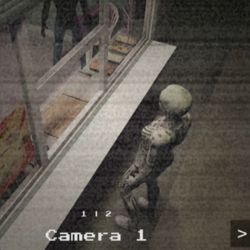
- Skinwalker: Looks normal in person, but on the main camera, you'll see its true form, which looks like a weird skeleton.
- Black Holes: Through the CCTV, you will notice grotesque black holes covering this customer's back.
- Nightvision Missing: Looks like a regular person on the normal camera, but when you activate night vision, they completely disappear.
- CCTV Screamer: When you check the camera feed, the creature will suddenly scream directly at the screen with a jumpscare.
- The Passenger: You won't notice anything odd in person, but on the CCTV you'll see a creature riding on their back.
- The Dancer: By using the night vision on your camera, you'll see this customer dancing in a disturbing way.
- Body Double (Front and Back): Through the cameras you will see that there is an identical copy of the customer standing near them or out back.
- Injured Anomaly: Look at their body in person. They have deep cuts, severe grazes, or collarbones jutting out abnormally.
- The Hacker: Will speak to you using your real Roblox username and threaten to cut off your internet connection.
- The Broken Neck Twins: Two girls who seem normal but bend their necks at impossible angles while talking to you.
- White Eyes Lady: Check her eyes; she has no pupils and they look completely glassy and white.
- Headless Man: Exactly as it sounds, a customer with no head arrives at the window.
- Gibberish Speaker: An old man speaking in an incomprehensible monster language.
- The Doppelganger: The audio gives you the clue. They mention something weird about the food being warm, or you comment that you've seen them before.
Harmless odd customers you should serve
Not everyone who looks strange in Scary Shawarma Kiosk wants to hurt you. There are weird customers who are actually human, and if you don't serve them, you'll be penalized on your inspection.
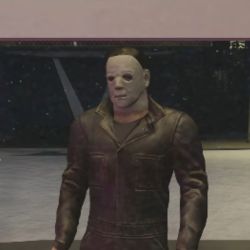
- Michael Myers: Looks like the killer, but it's just someone in a costume. Take his money and give him his food.
- Drunk Guy: Arrives with no money and promises to pay later. If you don't serve him, he'll return later to threaten you with a knife.
- The Smiling Man: Has a macabre grin and doesn't speak. According to the rules, give him a soda. He'll give you a weird envelope in exchange, but do not open it.
- The Faceless Man: Has a void instead of a face. The rule says to give him the food without looking directly at his face.
- Crazy Cat Lady: Brings a cat with a face-like marking on its back.
- Phone Lady: Her ringtone features terrifying screams, but she's totally harmless.
Environment events and how to survive
Besides the customers, the stand itself will experience paranormal events. If you don't handle them well, you lose.
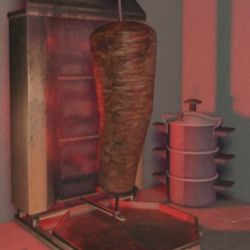
- The Meat: If the spinning meat starts pulsing, whispering, and the lighting turns red, turn off the grill immediately and leave the kiosk.
- The Watcher: A naked humanoid figure that spies on you from the ceiling or the fridge. Just look directly at it to make it disappear.
- The Inspection: Happens at 2:00 AM. A driverless car appears and the light turns red. Leave the kiosk and don't look back until the light returns to normal.
- Floating Fog Figures & Flickering Lights: If you see beings floating outside or approaching down the street, close the kiosk's window shutters and wait.
- The Moaning: You'll hear loud noises and red liquid will drip down. Do not look up, just exit the stand.
Follow these steps and you'll get through your shift with no issues. At the end of the day, it's a game of observation and fast reflexes. Good luck in the kitchen!
0
0
NEWSLETTER
Subscribe!
And find out the latest news
Etiquetas


