
'/%3e%3cpath%20d='M4.94162%205.99547L4.02701%205.08086L3.63428%205.47359L4.94162%206.78093L7.63768%204.08487L7.24495%203.69214L4.94162%205.99547Z'%20fill='white'/%3e%3cdefs%3e%3clinearGradient%20id='paint0_linear_2302_10195'%20x1='0.5'%20y1='10'%20x2='10.4939'%20y2='10'%20gradientUnits='userSpaceOnUse'%3e%3cstop%20stop-color='%234E10FF'/%3e%3cstop%20offset='1'%20stop-color='%23AB17DF'/%3e%3c/linearGradient%3e%3c/defs%3e%3c/svg%3e)
Updated: March 2025
Running low on storage space or just don't want to deal with massive downloads? Cloud gaming is the perfect solution. Today, I'll explain how to play Brawl Stars directly from your mobile or PC browser, without having to install absolutely anything, by using next-gen services that run the title in the cloud.
How to play Brawl Stars without downloading step by step
If you want to jump straight into the action and enjoy classic, fast-paced modes like Gem Grab (3v3) or Showdown (where you fight to be the last one standing) without going through your mobile app store, there are a couple of excellent options available today. These platforms process the popular Supercell hit on powerful external servers and stream the video directly to you in real-time, responding instantly to your taps or clicks.
Play free in your browser with Easyfun
Easyfun is a super accessible option because it grants you 6 hours of free playtime every single day. You just need to have an account and a compatible web browser, making it perfect for hopping into a few quick matches of Brawl Ball or defending the safe in Heist mode with your friends.
- Open your mobile, tablet, or PC browser and go to the official Easyfun website.
- Search for Brawl Stars within their extensive cloud gaming catalog.
- Click "Play". The system will prompt you to log in to ensure your progress is saved.
- Sign up using your Google account. It's a quick process and they won't ask you to link any credit card.
- That's it! You're inside the combat arena and can link your Supercell ID to recover all your brawlers.
If you prefer playing from a desktop computer or laptop, Easyfun lets you map keys to your liking so you don't have to rely entirely on the mouse. By default, you move across the map with W/A/S/D, fire your main shots with the Spacebar (double-tap it fast if you prefer Auto Aim), cast your devastating Super ability with the Q key, use your special gadgets with R, and activate the highly anticipated Hypercharge with L. Shift.
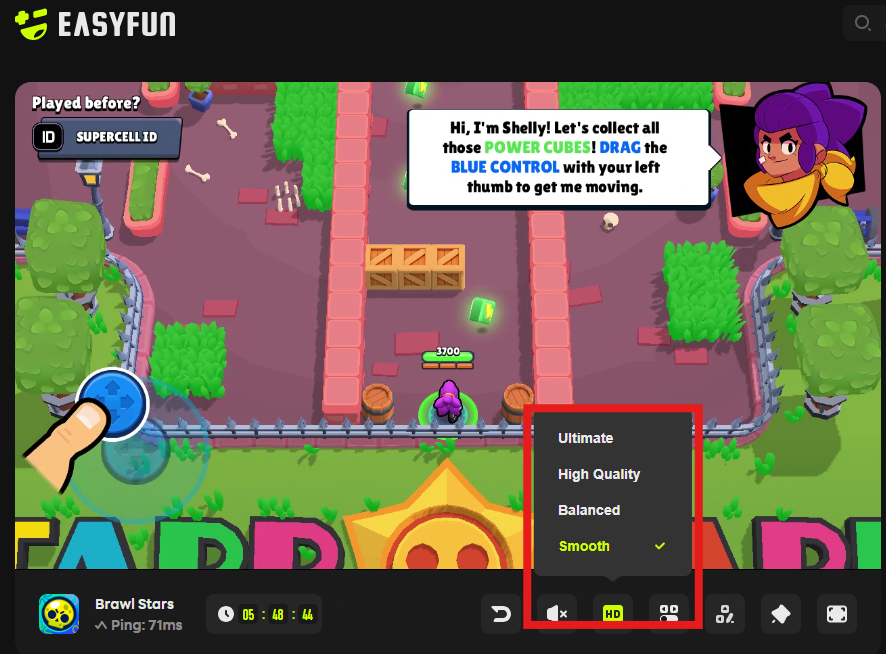
Also, if at any point during the match you feel a bit of lag generated by your internet connection, you can click the HD button located on their toolbar to slightly lower the streaming graphics quality. Just like when adjusting a streaming video, dropping the screen resolution makes your inputs register much faster, completely eliminating visual delay.
Play Brawl Stars in the cloud with CloudMoon
Another great alternative designed specifically to enjoy the Supercell universe without downloading files is CloudMoon, a mobile cloud gaming platform that stands out globally for its extreme focus on low latency. Its developers offer a stable ping below 55 ms thanks to having dedicated servers strategically spread across 22 locations worldwide.
- Go to the CloudMoon website from any device or download their mini-app on Android or iOS, which only takes up 15 MB (a tiny fraction compared to downloading the entire game along with its updates).
- Select Brawl Stars from their massive virtual library that features over 200 compatible games.
- Log in with your credentials or create a new account in just a few steps.
- Pick the plan that best suits your needs. They feature very affordable subscription options starting at US$4.99 per month, ideal if you are someone who wants unlimited playtime and wants to skip any kind of waiting queue.
- Launch the game. All the heavy processing is handled directly by their global GPU servers, meaning your hardware won't struggle whatsoever.


Advantages of playing Brawl Stars on the cloud
Enjoying competitive mobile games through modern streaming services brings very direct benefits for users, especially if your current phone isn't exactly the newest model on the market:
- Massive storage savings: A modest phone with just 32 GB of internal capacity can run hundreds of AAA and competitive titles flawlessly, as all the heavy files and graphical textures stay hosted on external servers.
- Stable and smooth performance: If you use a lower-end device (with barely 3 or 4 GB of RAM), solid platforms like CloudMoon or Easyfun let you play smoothly reaching up to 60 fps. Your phone won't overheat in your hands or drain its battery crazily fast as it would if it were rendering graphics locally.
- Zero waiting for patches or maintenance: You completely forget about having to wait for a mandatory new update to download or the extra gigabytes the latest brawl pass brings every new season. The cloud servers always have the most recent game version pre-installed and ready for you to just press the play button.
- Totally seamless crossplay: You can start your gaming session spending some time on your phone while commuting and then jump to your PC screen without losing any progress. This is perfect for players who want to rank up with the pinpoint accuracy of a keyboard and mouse while chilling at home.
To ensure you always get the best competitive experience and avoid annoying disconnections or frame drops in the middle of an intense Bounty match or while trying to score in Brawl Ball, I highly recommend always connecting to a 5 GHz Wi-Fi network, or if you're on a desktop PC, plugging an ethernet cable directly into your router. Remember to temporarily pause any heavy downloads running in the background or stop streaming HD videos on other home devices, as having a stable ping that doesn't fluctuate is much more critical for cloud gaming than having ridiculously high raw download speeds.
Ready to dominate the arena without filling up your device's memory? Pick your preferred platform and start playing Brawl Stars right now. For more cloud gaming guides and the latest news, keep exploring olagg.io.

0
0
NEWSLETTER
Subscribe!
And find out the latest news
Etiquetas


