
'/%3e%3cpath%20d='M4.94162%205.99547L4.02701%205.08086L3.63428%205.47359L4.94162%206.78093L7.63768%204.08487L7.24495%203.69214L4.94162%205.99547Z'%20fill='white'/%3e%3cdefs%3e%3clinearGradient%20id='paint0_linear_2302_10195'%20x1='0.5'%20y1='10'%20x2='10.4939'%20y2='10'%20gradientUnits='userSpaceOnUse'%3e%3cstop%20stop-color='%234E10FF'/%3e%3cstop%20offset='1'%20stop-color='%23AB17DF'/%3e%3c/linearGradient%3e%3c/defs%3e%3c/svg%3e)
Undertale es un juego brillante, pero cuenta con el inconveniente de estar disponible únicamente en inglés de forma nativa. Si pasas muchas horas jugando y te vicias por completo, es probable que termines entendiendo los diálogos de memoria. Sin embargo, la mejor experiencia se logra al disfrutar de esta gran historia en tu propio idioma. En este artículo te mostraremos paso a paso cómo parchear Undertale en español.
Requisitos previos para parchear Undertale en español
Antes de iniciar con la modificación de los archivos, necesitas instalar el juego base en tu computadora a través de Steam o GOG. Una vez que tengas el título listo en tu biblioteca, debes obtener las herramientas de traducción desarrolladas por la comunidad.
Para este tutorial, utilizaremos el parche con instalador oficial de la comunidad, el cual puedes descargar directamente desde la página web https://undertale-spanish.com. Te recomendamos usar siempre esta versión asistida; utilizar solo el archivo suelto sin un instalador puede alterar otros elementos del juego y provocar fallos en su ejecución.
Tu cuenta de OLA vale premios
Juega La Garra, busca el tesoro y canjea en la Tienda. Crear la cuenta es gratis.
Crear mi cuentaPaso a paso: Cómo aplicar el parche en Steam
Muchos usuarios cometen el error de ejecutar el instalador inmediatamente y se encuentran con que la traducción no funciona. Sigue estos pasos detallados para realizar el proceso correctamente:
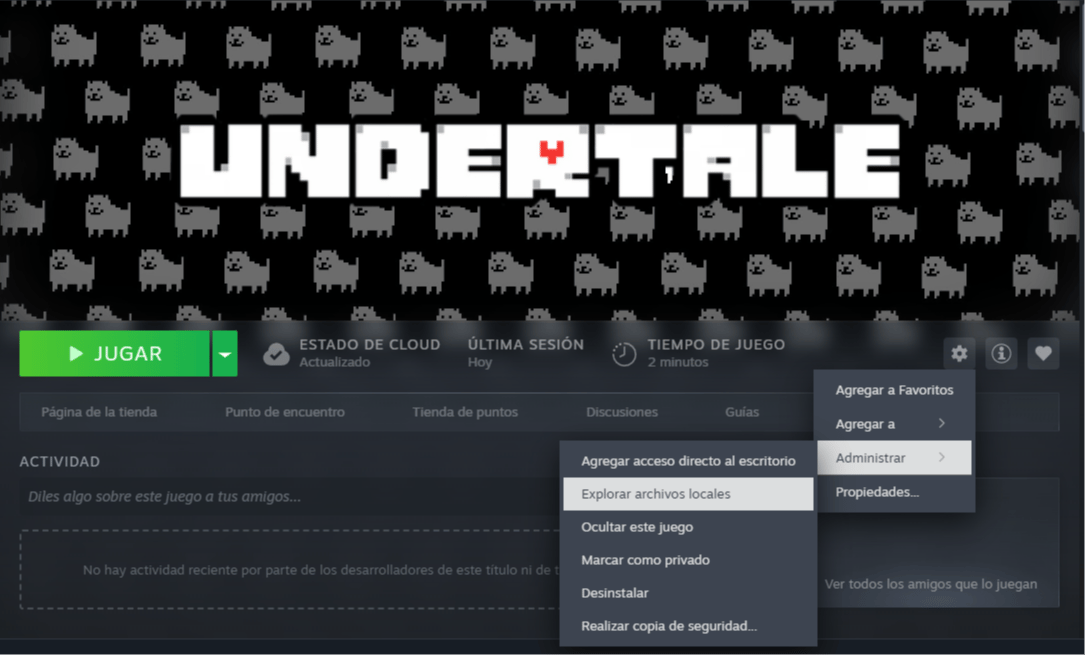
- Busca los archivos locales: Haz clic derecho sobre Undertale en tu biblioteca de Steam. Selecciona la opción Ver archivos locales y copia la dirección de la carpeta que se abre en tu explorador.
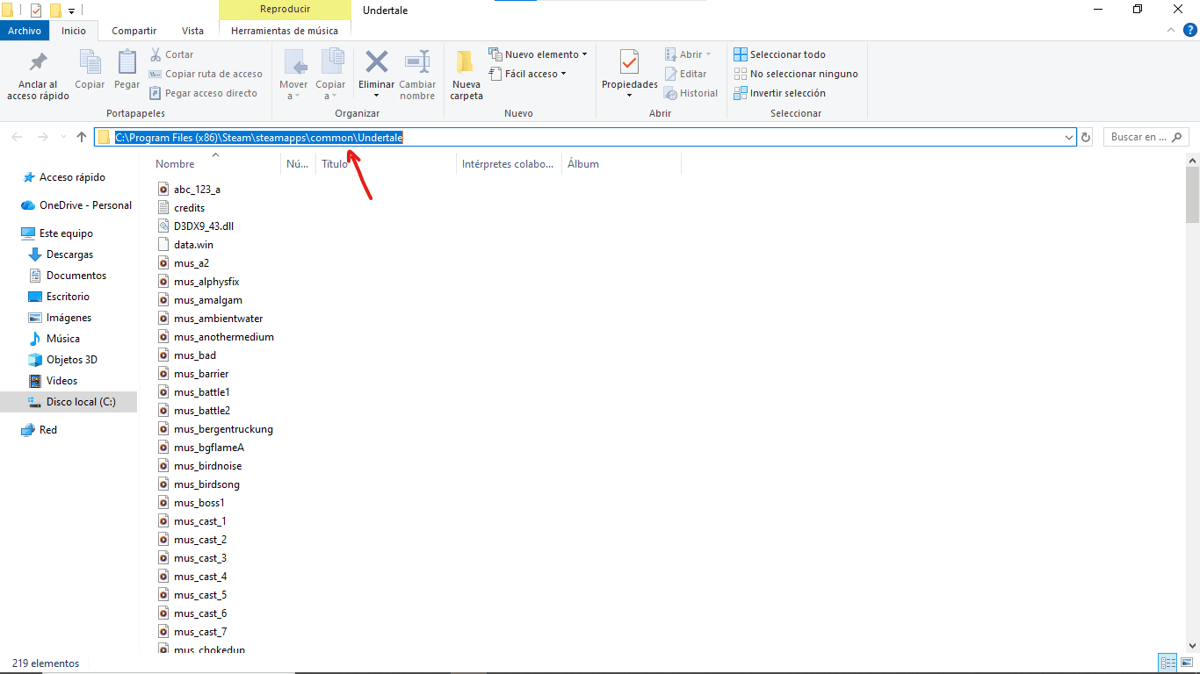
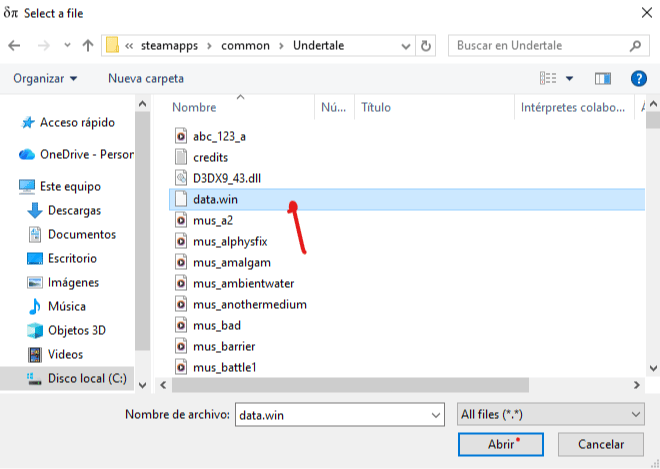
- Selecciona el archivo base: Abre el instalador del parche. En la casilla Original file, pega la dirección que copiaste anteriormente y selecciona el archivo específico llamado "data.win".
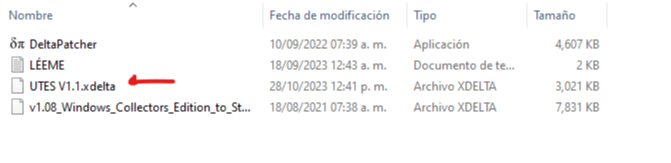
- Carga la traducción: En la sección Xdelta patch, busca el archivo de traducción llamado "UTES v1.1" dentro de tus descargas y ábrelo en el programa.
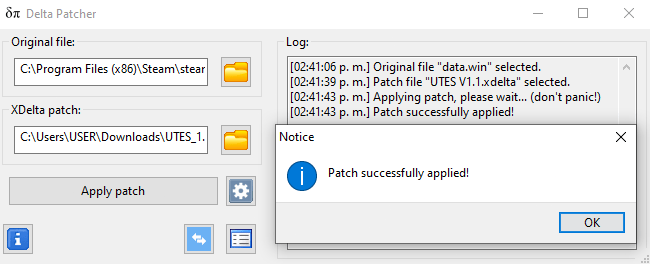
- Ejecuta la instalación: Presiona el botón Aplicar patch (Apply patch). El instalador te notificará en pocos segundos que la traducción se completó con éxito.
Configuración final del idioma
Una vez que el instalador confirme el éxito del parche, inicia el videojuego de forma habitual desde tu plataforma de preferencia. Si los textos del menú o los diálogos continúan apareciendo en inglés, dirígete a la sección de Settings (Ajustes) dentro del juego y cambia el idioma a español de forma manual. ¡Ahora ya estás listo para disfrutar de toda la aventura en el subsuelo!
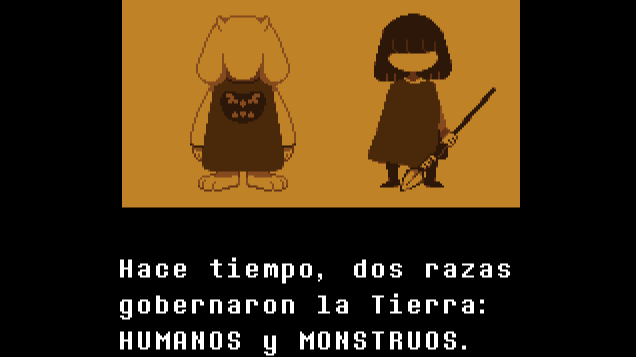
Felicidades ahora puedes jugar Undertale en Español
1
0
Otras novedades que podrían interesarte
Etiquetas


